Article
Iterate Until Your Application Is Ready To Send
How Next Role works with you version by version: tailor the CV, improve the highest-impact gap, reach the greenlight, and move calmly toward sending the application.
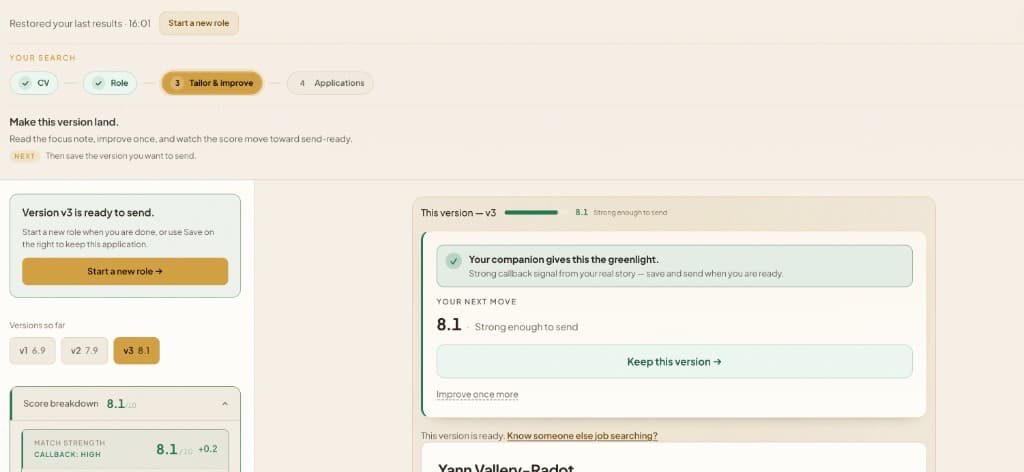
- 1Versions climb from 6.9 to 8.1
- 2The companion gives the greenlight
- 3The next step becomes sending
Start with a version you can react to
Next Role shapes the user's real CV around the role, then scores how strongly it lands. v1 creates momentum instead of a blank page.
Improve the single highest-impact gap
The companion does not overwhelm the user with generic notes. It points to the next change most likely to improve callback strength, then helps produce the next version.
Reach the greenlight and move forward
By v3, the score passes the bar. The product shifts from critique to action: save the version, choose the right format, and send with more confidence.
The moment that matters
A useful application tool should not leave you staring at a score and wondering what to do next. The important moment is when the version has passed the bar: the score is high, the callback signal is strong, and the next action is no longer “keep analysing”. It is “save this version and move toward sending”.
That is the journey Next Role is built around. Not a one-shot rewrite. Not a stack of generic suggestions. A calm loop that stays with you until this specific application is ready.
First, shape the story for the role
You start with the job description and your real CV. Next Role reads the role first, then shapes your experience around what the employer is actually asking for. The goal is not to make you sound like someone else. It is to make the fit easier to see.
The first version gives you momentum. It turns a blank page or an old general CV into a role-specific application you can react to, review, and improve.
Then improve the highest-impact gap
Most people do not need twenty vague notes. They need one clear next move. After each version, the critic highlights the strongest parts, the gaps, and the single priority most likely to move the application forward.
That creates a practical rhythm: read the focus note, improve once, and compare the next version. In the screenshot, that rhythm has already happened across v1, v2, and v3. The application did not become ready by accident. It became ready because the user and the companion kept working on the same role together.
The greenlight is a handoff, not a finish line
When a version reaches the greenlight, Next Role should feel encouraging: “Congratulations — this version has passed the bar.” From there, the product helps you keep the version, choose the right export format, and mark what you sent.
That matters because job searching is not only about producing a document. It is about completing the cycle: tailor, improve, save, send, and keep track of the applications that are now in motion.
Save your master CV once, then move faster
With a free account, your master CV becomes the source of truth. You do not have to rebuild your story every time a new role appears. You bring the role, Next Role shapes the version, and your application history stays organised.
That saved context is what turns the tool from a useful preview into a companion for the wider search. You can reopen versions, refine again, and keep moving without losing the thread.
If it helps, share it
A job search can feel lonely, especially when good people are applying carefully and still hearing little back. If Next Role helps you feel steadier, share it with someone else who is trying to make one application land.
Start with one role today. Register when you want the full loop saved around you. Then send the strongest version with a little more clarity than you had when you arrived.
Common questions
Why does Next Role create multiple CV versions?
Because strong applications usually improve in passes. The first version gives you a tailored starting point, the critic shows the clearest gap, and each refine pass moves the application closer to a greenlight signal for that specific role.
What does the greenlight mean?
The greenlight means this version has reached the strongest callback-probability band in the current scoring model. It is not a promise of an interview, but it is the product saying: this application is strong enough to save, send, and track with confidence.
Do I need an account to use the full loop?
You can try the first read without an account. Creating a free account lets Next Role keep your master CV, save application versions, reopen them later, and track what you actually sent.
Can I share Next Role with someone else who is applying?
Yes. If the flow helps you feel clearer, share it with a friend or colleague who is in the same search. A saved, calmer application process is often most useful when someone is applying under pressure.